Skip to content
3D experiences Accessibility Let’s talk
ES (Español)

3D web experiences

3D that won’t weigh your site down.

Fast on your customer’s phone, found by Google and usable by anyone. Not a promise, a measurement: Inside the Frame, a whole 3D room, scores 99–100 for performance on mobile.

  • Polished Reflects the light: the shine moves with it.
  • Matt Absorbs it: it barely changes.
  • Textured Breaks it up: every ridge casts its own shadow.
The same stone in three finishes. Move the light and see how each one responds: that’s what a photo can’t show.

3D has a bad reputation. Usually deserved.

Sites that take forever to load, that Google can’t read and that you can’t use without a mouse. These are the questions people ask me before commissioning anything in 3D, each with its measured proof. They come from VETA and Inside the Frame, two of my published projects, right below.

  • Won't it be slow on a phone?

    It doesn't have to be. It's built for phones from the start: textures sized for each screen, 3D loaded when it's needed, and nothing redrawn unless it moves.

    Inside the Frame on a phone, according to Lighthouse
    • 99–100 performance
    • < 2.5 s until the main content shows, what Google rates as good
    • < 25 KB of code to start

    Measured on 10 October 2026 on all five pages: the entrance hall and the four rooms.

  • Will Google find it?

    Google doesn't look inside a 3D scene: it reads text. So everything that matters is also in HTML, with its own address for each room or product. The 3D sits on top of the text, not instead of it.

    How a room from Inside the Frame shows up on Google

    artgallery360.art › wave

    Wave: Under the Wave off Kanagawa — Inside the Frame

    Katsushika Hokusai, c. 1830–32. A wall of Prussian blue rears over three fishing boats, and Mount Fuji — the subject of the whole series — is the smallest thing in the picture.

    The page's real title and description. All five pages, the entrance hall and the four rooms, have their own.

  • Can anyone use it?

    Yes: with a mouse, a finger, a keyboard or a screen reader. And without dragging, because there are buttons to turn and zoom. Both projects meet WCAG 2.2 AA, the European accessibility standard, and their audits are published.

    What NVDA, a screen reader, said while going through Inside the Frame with the keyboard
    1. Room III, Stillness: 360 degrees view inside Water Lily Pond, 360 degrees view
    2. Things to look for, lista, con 3 elementos, Weeping willows, botón, expandido
    3. Rooms, botón, abre diálogo

    The site is in English; NVDA was set to Spanish. Recorded on 9 October 2026.

    Both audits, published (in Spanish): VETA · Inside the Frame

  • What if the phone or browser can't handle 3D?

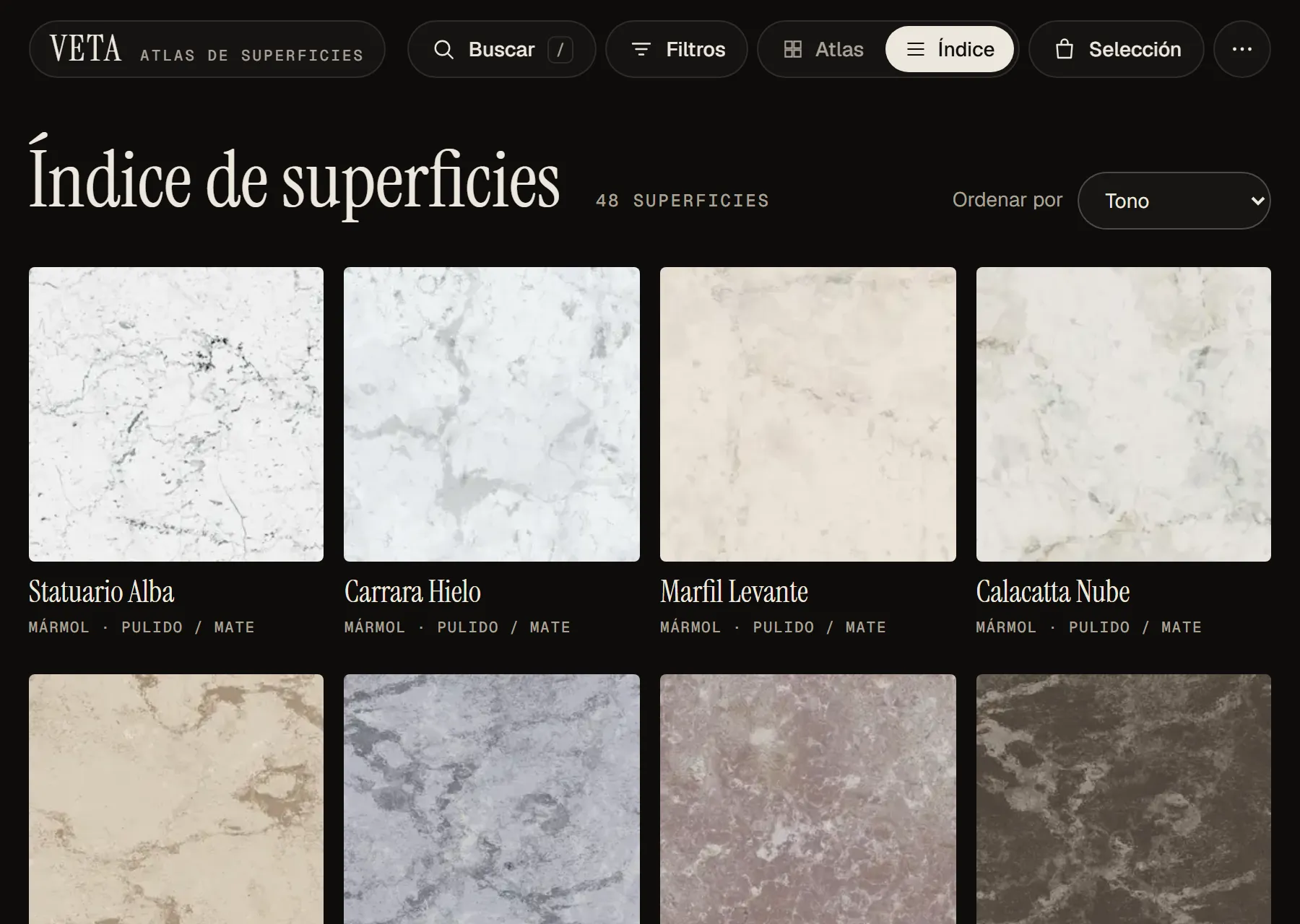
    Nobody is left out. If the device can't cope, the site shows the same content without 3D: VETA, the index of all 48 surfaces with their photos; Inside the Frame, every work with its description.

    Both sites in a browser without 3D
    • VETA without 3D: the surface index, with the photo, name and finish of each one.

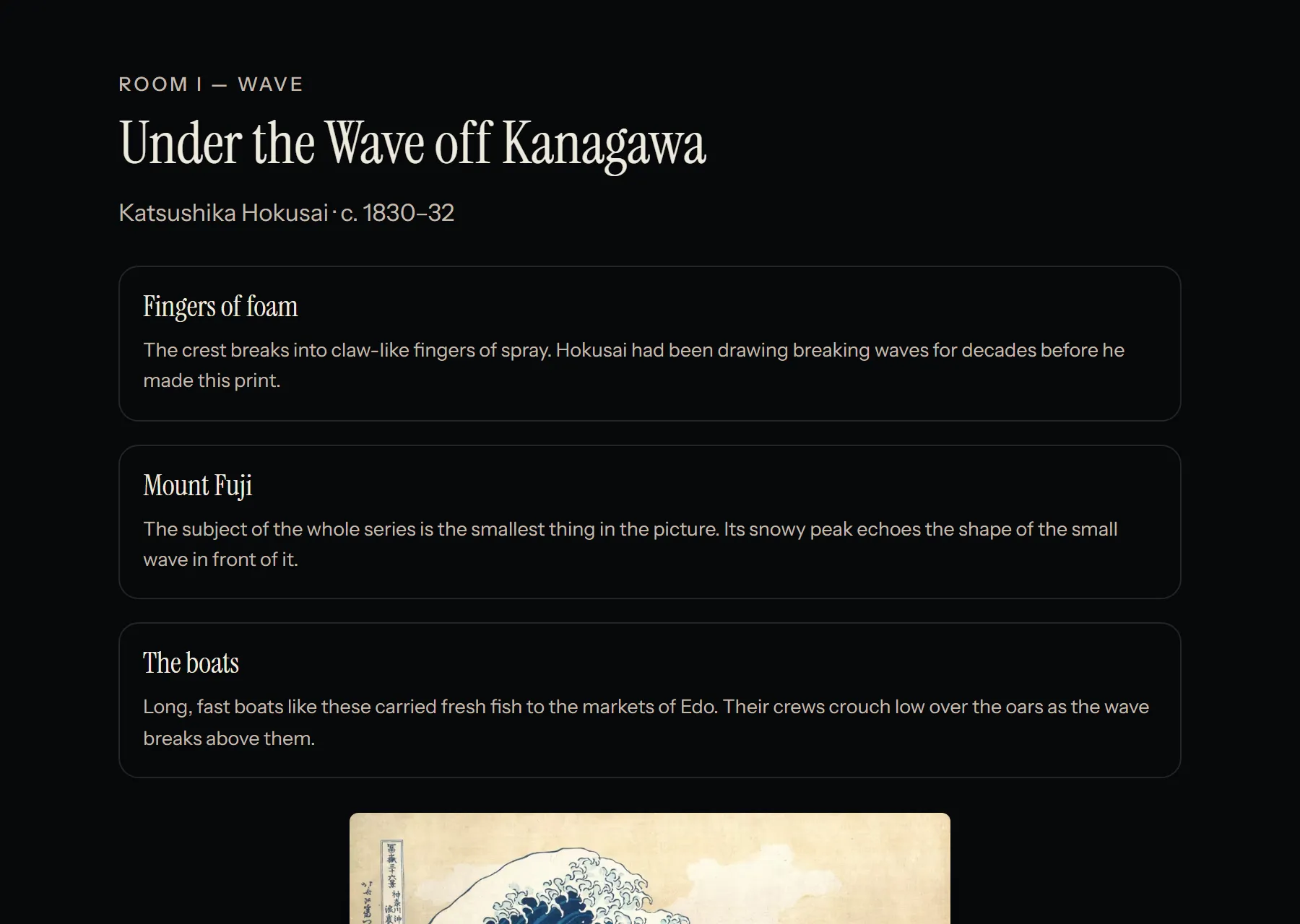
    • Inside the Frame without 3D: the Wave room as text, with the painting, its artist and its points of interest.

  • Won't it make people dizzy?

    If your system asks for less motion, the experience stays still. And anything that moves on its own can be paused.

    Right now your system asks for normal motionless motion. If you change the setting, this page adapts instantly.

Two live projects. Open them on your phone.

They aren't client commissions: I built them to show that 3D can be fast, findable and easy for anyone to use. They're live, measured and audited.

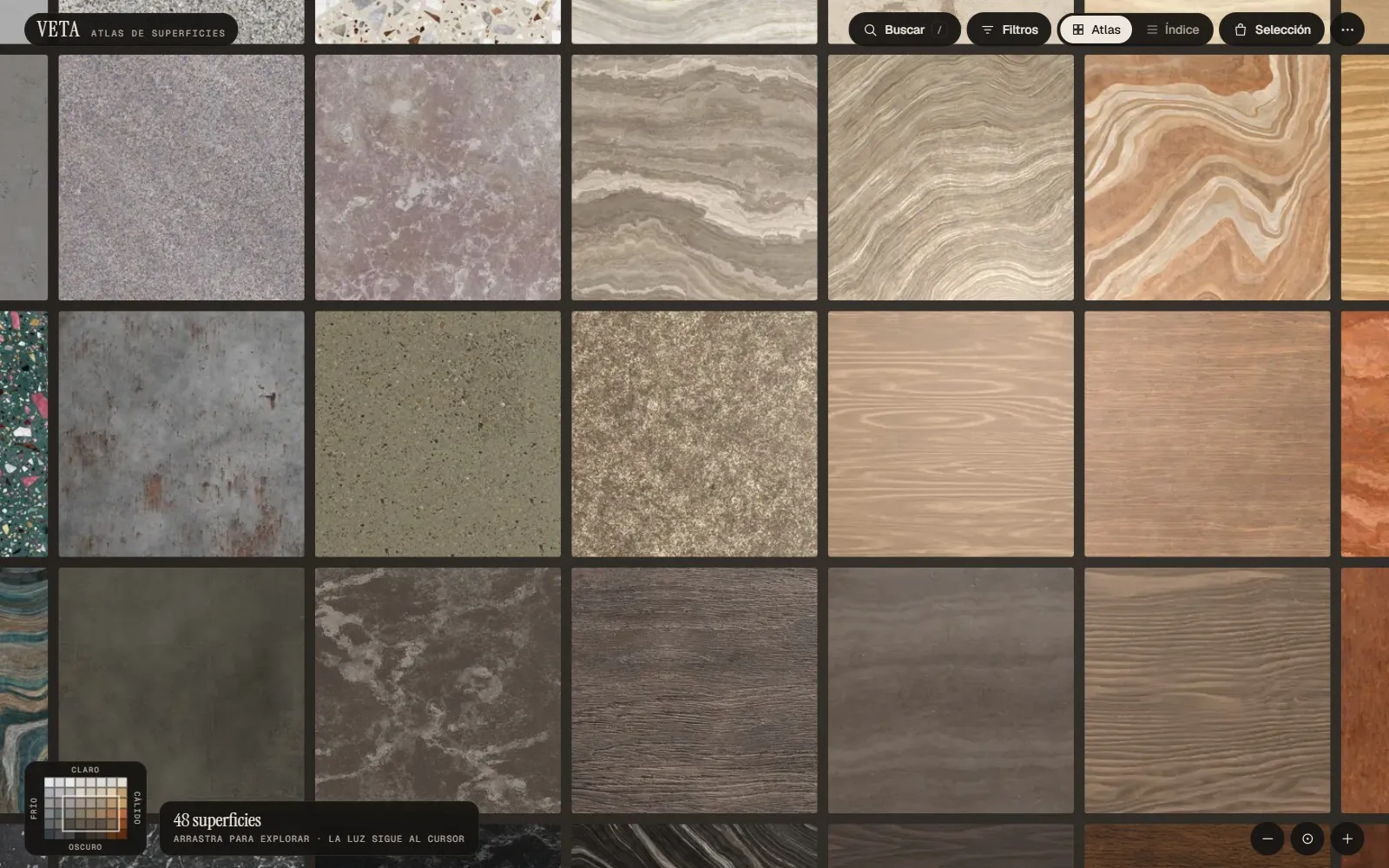
The VETA grid with marble, terrazzo, granite and wood samples arranged by tone.
Surfaces · 3D catalogue

VETA, an atlas of surfaces

The problem “It looked like a different colour in the photo.”

48 finishes on a map you explore like a plan. A light that follows the cursor tells polished from matt and textured, and every surface can be seen at real scale and placed in a 3D room. You choose before ordering samples.

45 KB
of code to start. Textures arrive afterwards, sized for each screen.
0
frames drawn while you're not touching anything.
48
surfaces also in a text index, which is what you see without 3D.
WCAG 2.2 AA
17 issues in the audit and 2 more afterwards, all fixed and checked with NVDA.
Open VETA (opens in a new tab) Read its accessibility report (in Spanish)
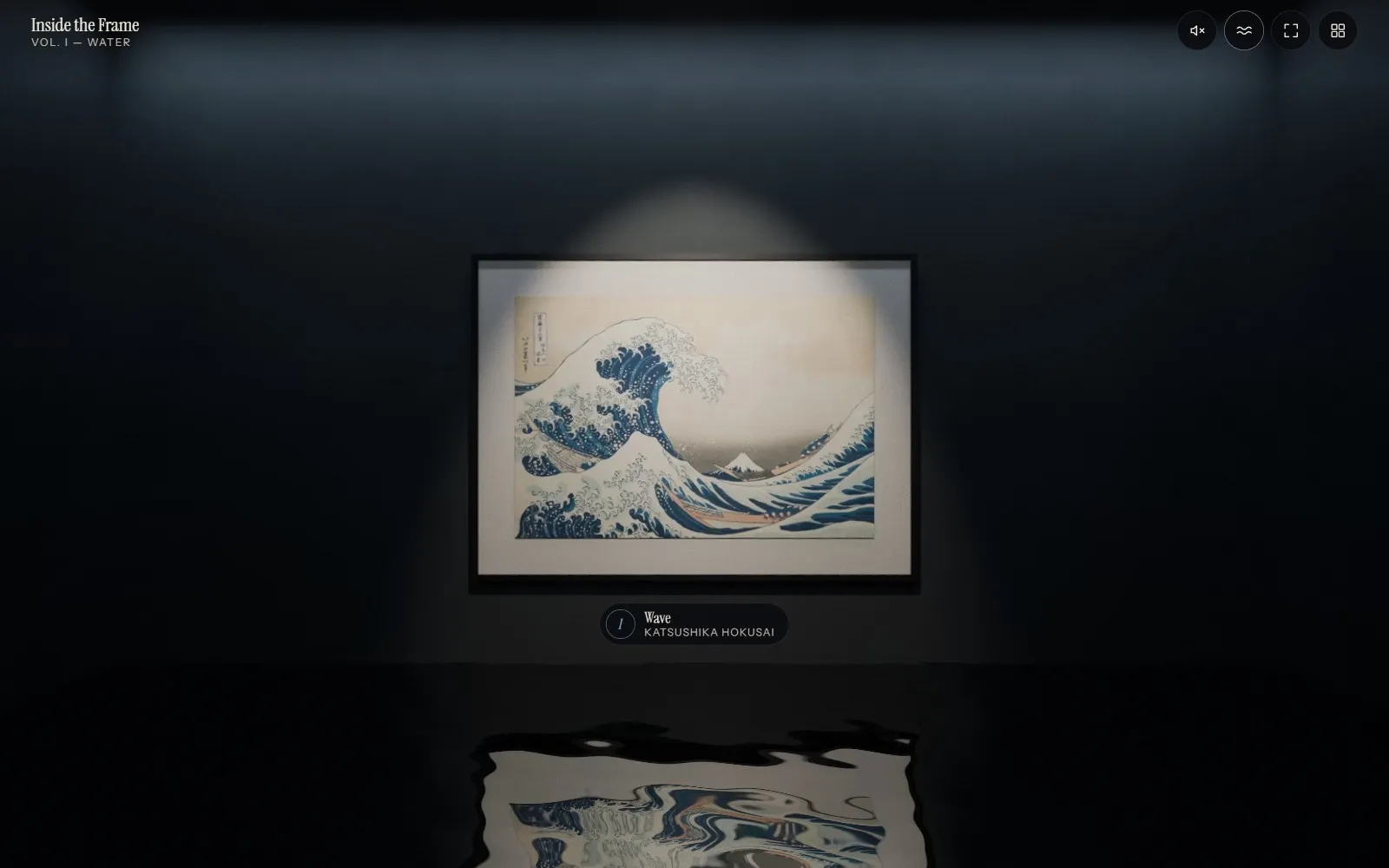
The dark room of Inside the Frame with Hokusai’s Great Wave under a spotlight, reflected in the water on the floor.
Culture · 360° immersive room

Inside the Frame

The problem The collection is only seen by those who can visit.

Four paintings by Hokusai, Hiroshige, Monet and Turner turned into places you can stand in, with optional sound. Every scene is described in writing, and you turn the view by dragging, with the keyboard or with buttons.

99–100
for performance in Lighthouse on mobile, on all five pages.
< 25 KB
of code to start. The panorama is downloaded at the size each screen needs.
5
pages, the entrance hall and one per room, each with its own title and description for Google.
WCAG 2.2 AA
9 issues in the audit and 1 more afterwards, all fixed and checked with NVDA.
Open Inside the Frame (opens in a new tab) Read its accessibility report (in Spanish)

Performance measured with Lighthouse in mobile mode on 10 October 2026.

A photo flattens exactly what makes someone buy.

  • If you sell surfaces, materials or products

    Ceramics, stone, wood, furniture

    On a product page with a photo, everything looks alike. Polished and matt come out the same, the tone shifts from screen to screen and nobody can picture the size. Your customer orders samples to be sure, or goes to look elsewhere.

  • If you look after a collection, a heritage site or a destination

    Museums, foundations, galleries, councils and tourist boards

    The collection is only seen by those who can visit, during opening hours. A photo gallery doesn't convey what it feels like to stand in the room. And if you're a public body in the EU, your website has to be accessible by law (Directive (EU) 2016/2102).

First something you can touch. Then everything else.

  1. I work out what it has to show

    Before modelling anything, we talk about what visitors need to understand (a finish, a scale, a route) and what material you have. With that clear, I send you a fixed quote with price and timeline.

  2. A prototype in the browser

    I show you a first version that works, not a render or a slide deck. You decide on something you can try on your own phone.

  3. I build it and test it

    I finish it and test it on phones, with a keyboard and with a screen reader, as in the VETA and Inside the Frame reports. You get it integrated into your site or as a page of its own.

Before you ask for a quote.

How much does it cost?

It depends on what has to be shown: a viewer for one product isn't the same as a catalogue of two hundred finishes or a room with sound. That's why there's no price list: after a call I send you a fixed quote, with price and timeline.

How long does it take?

It depends a lot on the kind of project. The timeline goes in the quote, next to the price, so you know before you decide.

What do I need to give you?

Whatever you have. If you already have photos, scans or 3D models of your product, great: we start from there. If not, I make them. And if there's something I can't do, I tell you before we start.

Will it fit into my website?

Yes. You get it integrated into your site or as a page of its own.

Can I add products or change things later?

Yes, in one of two ways: with a content management system (CMS), so you update it yourself, or with a maintenance plan where I take care of it. We decide when we put the quote together.

Does the law require it to be accessible?

If you're a public body in the EU, yes. If you're a business, it depends on what you sell and your size: the European Accessibility Act covers many products and services sold to consumers. Either way, what I deliver meets WCAG 2.2 AA. More on accessibility and the law →

What if 3D doesn't add anything for me?

I'll tell you on the first call. If your product comes across just as well in a good photo, you don't need 3D, and I won't sell it to you.

CONTACT

What do you want to show?

Tell me what you sell or what you want to show, and to whom. I’ll tell you whether 3D makes sense for you or whether you don’t need it. No strings attached, no PowerPoints, no smoke.

I get back to you in under 24 hours. Business days.

Available for new projects